Pull order files from S3 or Cloudflare R2
Watch a bucket prefix for new order objects, with a read-only key.
Create a read-only key, not your own
Do not reuse a key that can write. ProcuLink only ever lists and reads: it never uploads, never deletes,
and never needs s3:PutObject or s3:DeleteObject.
Two actions are required, and both matter — s3:ListBucket scoped to the prefix so new objects can be
discovered, and s3:GetObject on the objects under it:
{
  "Version": "2012-10-17",
  "Statement": [
    {
      "Sid": "ProcuLinkListPrefix",
      "Effect": "Allow",
      "Action": "s3:ListBucket",
      "Resource": "arn:aws:s3:::acme-order-exports",
      "Condition": { "StringLike": { "s3:prefix": "orders/inbound/*" } }
    },
    {
      "Sid": "ProcuLinkGetObjects",
      "Effect": "Allow",
      "Action": "s3:GetObject",
      "Resource": "arn:aws:s3:::acme-order-exports/orders/inbound/*"
    }
  ]
}
Cloudflare R2 uses S3-style access keys. Create an R2 API token scoped to read-only on the same bucket, and keep the account endpoint URL it shows you — step 3 needs it.
If this fails
A key with only s3:GetObject looks like it works and then imports nothing: ProcuLink can read an object
whose key it already knows, but it cannot discover new ones. If polling is silent, check ListBucket
before anything else.
Note the exact prefix
Get the prefix from whoever writes the objects — orders/inbound/, not "the orders folder".
A wrong prefix fails silently, the same way a wrong SFTP path does: ProcuLink connects, lists an empty
result, and imports nothing, with no error to look at. Watch for a leading slash in particular — object
stores usually do not expect one, and /orders/inbound/ matches nothing when orders/inbound/ is right.
Leaving the prefix blank lists the whole bucket. That works, but scoping it keeps polling fast and keeps unrelated objects out of your Inbox.
Fill in the form
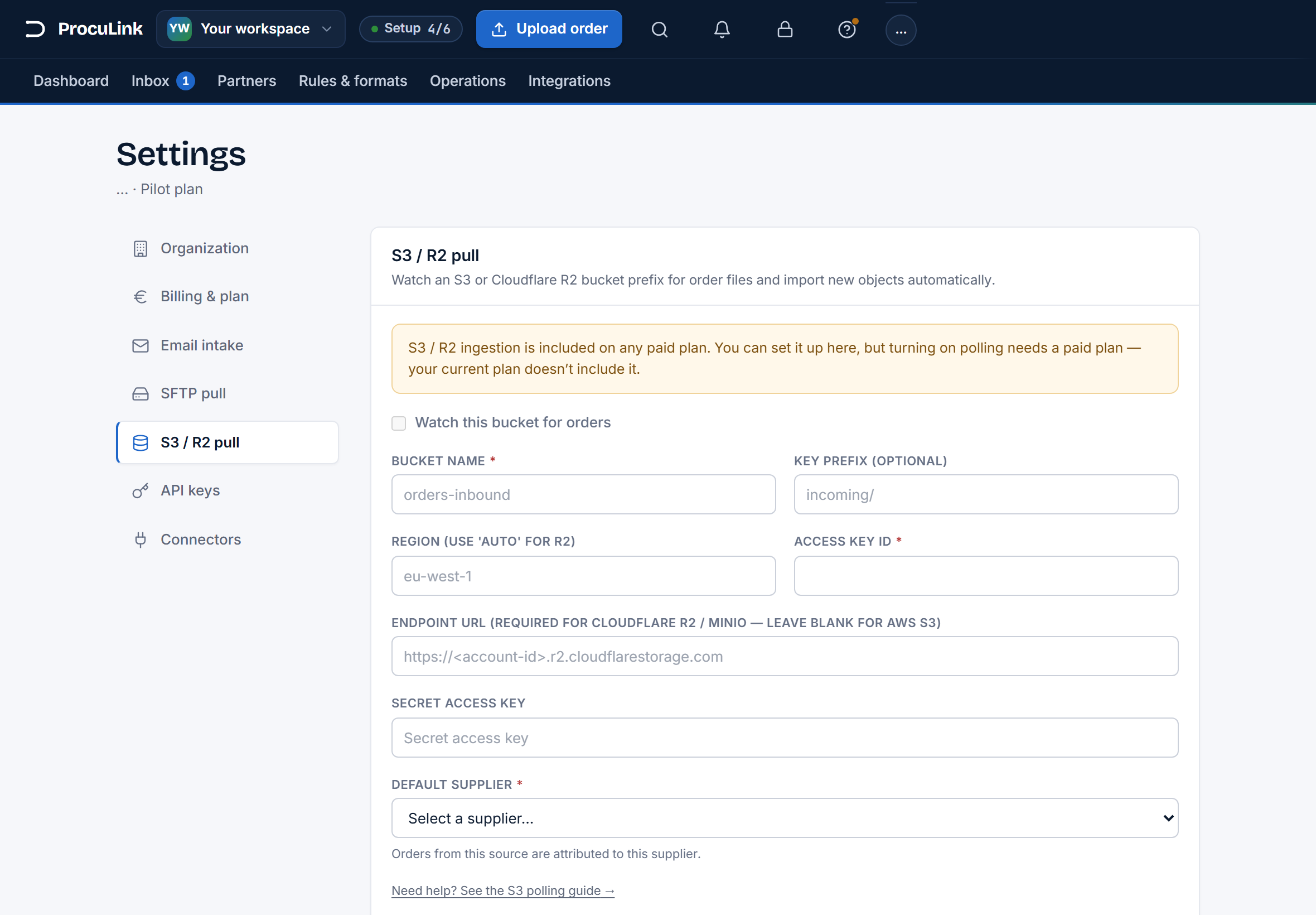
Open Settings → S3 / R2 pull — "Watch an S3 or Cloudflare R2 bucket prefix for order files and import new objects automatically."
| Field | What to enter |
|---|---|
| Bucket name | The bucket, for example orders-inbound. Required. |
| Key prefix (optional) | The prefix from step 2, for example incoming/. Blank lists the whole bucket. |
| Region | The bucket's region, for example eu-west-1. For R2 use auto. |
| Access key ID | The read-only key from step 1. Required. |
| Endpoint URL | Required for Cloudflare R2 and MinIO; leave blank for AWS S3. For R2 this is https://<account-id>.r2.cloudflarestorage.com. |
| Secret access key | The key's secret. Never shown again once saved — leave it blank on a later edit to keep the stored one. |
| Default supplier | The supplier imported objects are attributed to. A bucket drop carries no routing of its own. Required. |
If this fails
Saving with the toggle on and something missing names the field: "Enter a bucket name before enabling.", "Enter the access key ID before enabling.", or "Choose a default supplier before enabling."
Turn on Watch this bucket for orders, and save
Switch on Watch this bucket for orders and press Save. You should see "S3/R2 pull settings saved."
From then on ProcuLink lists the prefix on a schedule, imports objects it has not seen before, and records each one so it is not imported twice. Your bucket is not modified — nothing is deleted, nothing is moved, and the record of what has been processed lives on the ProcuLink side.
The toggle stays on, and objects already sitting under that prefix begin appearing in your Inbox as orders.
If this fails
The toggle refusing to move is the plan gate, not a credential problem: "S3 / R2 ingestion is included on any paid plan. You can set it up here, but turning on polling needs a paid plan — your current plan doesn't include it." Your configuration is saved either way.
Tell the two silent failures apart
Both of these look identical from the Inbox — nothing arrives — and they have different fixes:
- Wrong prefix, or missing
s3:ListBucket. ProcuLink lists successfully and finds nothing. Re-check the exact prefix against a real object key, then check the policy. - Wrong region or missing endpoint. The connection fails outright rather than returning an empty list.
For R2 this is almost always a blank Endpoint URL or a region other than
auto.
If this fails
If objects are being fetched but the orders do not parse, that is a document problem, not a storage one — polling only retrieves the object. See troubleshooting common parse errors.
Confirm the first real run
A working connection proves ProcuLink listed the bucket. It does not prove any particular object parses. After the first scheduled run:
- Orders appear with the purchase-order numbers you expect.
- The count is roughly what was written to the prefix.
- Nothing is stuck. A pile of orders needing attention usually means the default supplier is right but their catalog is missing — see import a supplier catalog.
Objects land in the bucket and orders appear in ProcuLink with no one in the loop, on a key that could not change anything in your storage even if it leaked.